Solved “Stream is offline” in facebook live preview

I spent several hours this morning trying to figure out why it didn’t work.
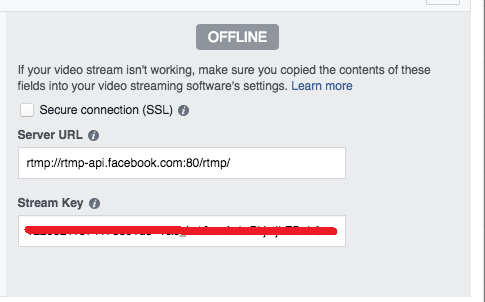
I was attempting to stream video to facebook live from my Windows PC with OBS encoding software. The encoding software was happily transmitting to somewhere, but the facebook preview in the publishing tool kept on reading “OFFLINE – If your video isn’t working, make sure you copied the contents of these fields into your video streaming software’s settings.”


Solution: Yes, I found the solution. In my case it was almost embarrassing. After I tried streaming to youtube and everything worked spot-on, I went back to another try again with facebook. But this time I noted a small banner at the top of my browser window. It turned out I was blocking some flash player content on the page. As soon as I clicked on “allow”, the OFFLINE message vanished and I could see my preview.

Happy streaming!

-1 comments???

Now and then, I answer some questions over at Yahoo answers.
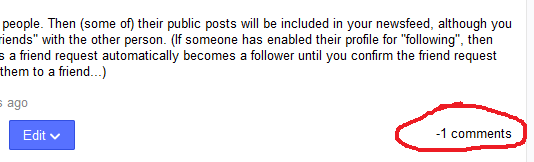
Today, I noted an interesting thing. One of my answers suddenly had -1 comments!

How could this ever happen?

Well, I happen to know half of the story, so I can make up at least of part of the rest.

There was one comment there.
Then I responded to the first comment, but made a typo, so I posted again, now without the type.
At this point there were three comments. But I could really live without the second one, with my typo. And, guess what, when I hovered over the comment, a little button with an X appeared.
I clicked on it, but nothing happened. So I clicked again a few times. My comment was still visible. I figured it might be some issue with some script not executing correctly in Firefox, so I started another broswer (chrome), logged in and went to the answer.
And there it was: -1 comments! I reloaded the page in Firefox, and got -1 comment there, too.
If you don’t believe me, here’s a screenshot. I’ve manually painted around the offending part!
minusone

So it seems, that the button is tied to a script, which calls back in ajax-style to delete the comment on the server. But the button doesn’t make itself unclickable, once clicked. And the button remains on page, and can be clicked several times. And the comments aren’t referred to with individual, permanent addresses, but rather “delete the second comment please. And a dumb script on the server decrements the total number of comments without even reflecting that it was one and the same comment that was deleted a couple of times…

Bug report

Hi there. I wanted to file a bug report, but couldn’t find any link for where to do it. So I post it here instead…

I’ve been using unfriend finder on Chrome for a while, and it works reasonably well, although the intermediate ad page before reaching the useful interface is a bit exhausting (especially when there are lots of ads sprayed all over the main interface, too). Oh, at least when one has some 2000 facebook friends, the plugin seems to sporadically regard some friends as disappeared, although they are still there. I guess an unstable internet connection could be a reason for this. (And that would also indicate that the plugin may be using some noticeable bandwidth for its work.)

I use Firefox as my main browser. And today I noticed that unfriend finder now is available for firefox, too. So I installed it. The plugin seems to work. After a while, the plugin button showed me that there were news for me.

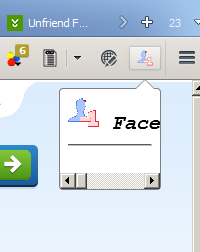
But when I click on the button, the plugin opens a way too small window. So I can’t get to the link for the main interface. (And the window is only scrollable sideways!)

toosmallwindow

unfriend finder 1.2.4
firefox 42.0
Windows 7

Best regards,
Tobi

Virtual version of Östhammars Poetry street on Google maps

Recently, the main activities of the Festival of Words in the small Swedish city Östhammar occured. A part of the festival was the “Poetry Street”, where quite a few short poems on the festivals theme (for the year 2014, the topic is freedom) were on display in the windows of various shops in the centre of the city.

Two of my own texts are included, but since I live too far away from Östhammar to see those displays myself, I suggested that we should back up with virtual version of the Poetry street. This way, anyone can visit the exhibition, without going to Östhammar. And the exhibition will still be around when the poems are taken down in the shops physical display windows. And, finally, the internet version can be useful even to someone visiting Östhammar, since s/he has the possibility to check that no single poem on display was missed!

First, I'll give a quick look at what the map looks like. It’s interactive. Try clicking on some of the placemarks, to see the included poetry! Continue reading

Create your first WP plugin to start using Google analytics, while excluding yourself from tracking

You know the situation: You make your wordpress site a little bit better every day. But: How many visitors do you have? Where do they come from? What pages are they reading? And how do they react to various articles and changes on your site?

Right, you need statistics.
One of the most convenient ways to get some statistics is to use google analytics. As with most other things, there are good and bad sides.

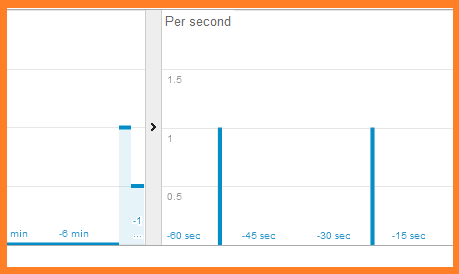
Screenshot excerpt: Real time view of events in Google analytics

Real time view of events in Google analytics


Continue reading

Fraudulent sales methods in Spain

A few days ago, we were targeted by a team of sales people, who use fraudulent and very aggressive sales methods when trying to convince people in Spain to move to another internet provider.

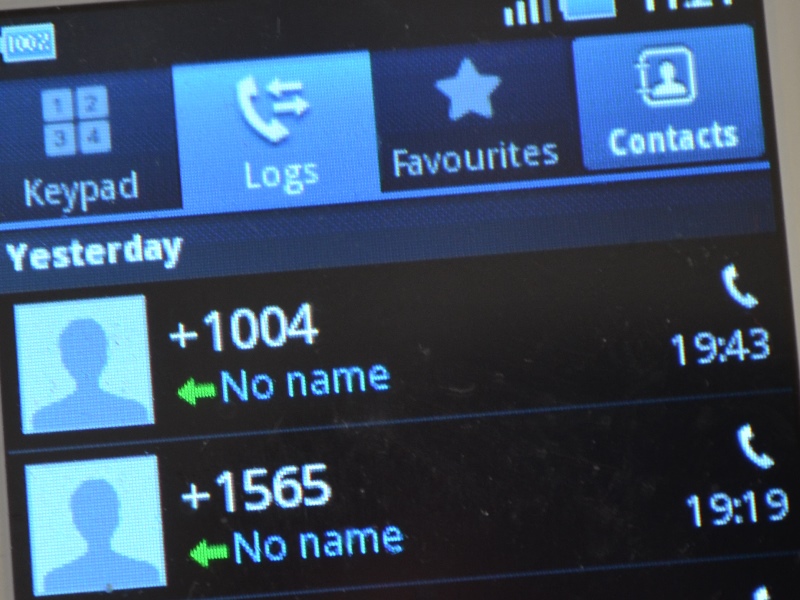
Phone scrren with call log, showing +1004 and +1565 Continue reading

Have you noticed door-opener-spam?

When you install a fresh copy of wordpress, the most popular blogging platform in the world, you´ll automatically get two plugins:

  • Hello Dolly,a small demo plugin, that can be deleted safely.
  • and Akismet, a cloud-based protection against spam comments.

Obviously, lots of people want to put links to various weird things on your blog, so they use bots that spray more or less strange comments all over the blogosphere. Akismet does a good job on stopping most of these comments from being published on your blog.

But not all spam is that obvious to an unaided eye. Here and there, the comment will look just nice. It may just carry a couple of generic words about what a great site you´ve got. And no links. So what´s the issue? Hmm. Most of these generically nice comments use another thing: check the URL of the blog author. It´s very possible that it points to some very strange page on the internet that you´d prefer not to publish (nor follow).

However, recently I´ve seen that some of these generically nice comments pass the check of Akismet, and wordpress ask me to verify them. So what does a spammer gain from saying a couple of nice words about a blog, without even including any links???

Yes, this got me thinking for a while.

But I think I know what this is about:
Most blogs have a setting, where comments will go public immediately, if the comment author already has written an approved comment before. So, if you approve this comment "Hello, what a nice site you´ve got here!" Then the same spambot will be back a couple of days later, and this time, it will publish tons of garbage on your blog, and it will immediately become visible to all your visitors.

OK! This is just a theory. But I don´t want to prove it by trying. There´s enough spam around anyway.

Shaping Windows 8.1 and adding Russian custom phonetic layout

I’ve been using Windows 7 for quite some while now. And I’m really happy with it. Even so happy that I continue recommending friends and family to go for Windows 7 when buying a new computer, if they’ve got any chance to avoid Windows 8.

But, a couple of weeks ago we needed to get a new computer for my wife. And this time, we didn’t have any choice. So a couple of hours later, I started my attempts to turn a computer with Windows 8.1 into a useful tool for work.

Bad surprise number 1: Windows 8 doesn’t really bother about the the difference between a laptop and a tablet. Continue reading

Adjusting Google Analytics analytics.js (Universal analytics) for meaningful blog statistics

I’m running a wordpress site, where we want to keep an eye on the number of visitors and their behaviour on the site. It turned out to be very easy to get started: Create an account in google analytics and 10 minutes later, you’ll be instructed to enter a code snippet within your head tags (This is the version served for so called Universal Analytics, where the file analytics.js is called.):
<script>
(function(i,s,o,g,r,a,m){i['GoogleAnalyticsObject']=r;i[r]=i[r]||function(){
(i[r].q=i[r].q||[]).push(arguments)},i[r].l=1*new Date();a=s.createElement(o),
m=s.getElementsByTagName(o)[0];a.async=1;a.src=g;m.parentNode.insertBefore(a,m)
})(window,document,'script','//www.google-analytics.com/analytics.js','ga');

ga('create', 'UA-xxxxxxx-x', 'sitename.com');
ga('send', 'pageview');
</script>

Since I use the very functional wordpress theme graphene, adding the code was very easy: there’s a special section in the theme settings for that. Continue reading

Getting through

So, you need to call CITC, the telecom regulator in Saudi Arabia?
The good news is that their contact number is nicely indicated on their website.
The nice news is that their number is even correctly reflecting the fact that the country added an extra digit to all fixed telephone numbers a few months ago.
The bad news is that the switchboard seems to be heavily overloaded. According to my statistics, I may end up talking to a switchboard operator only once in 30-50 attempts. But, since they use IVR with DTMF selection, I have to pay for every attempt…
But I keep on trying. :)